
Recurring cues instead of one alarm
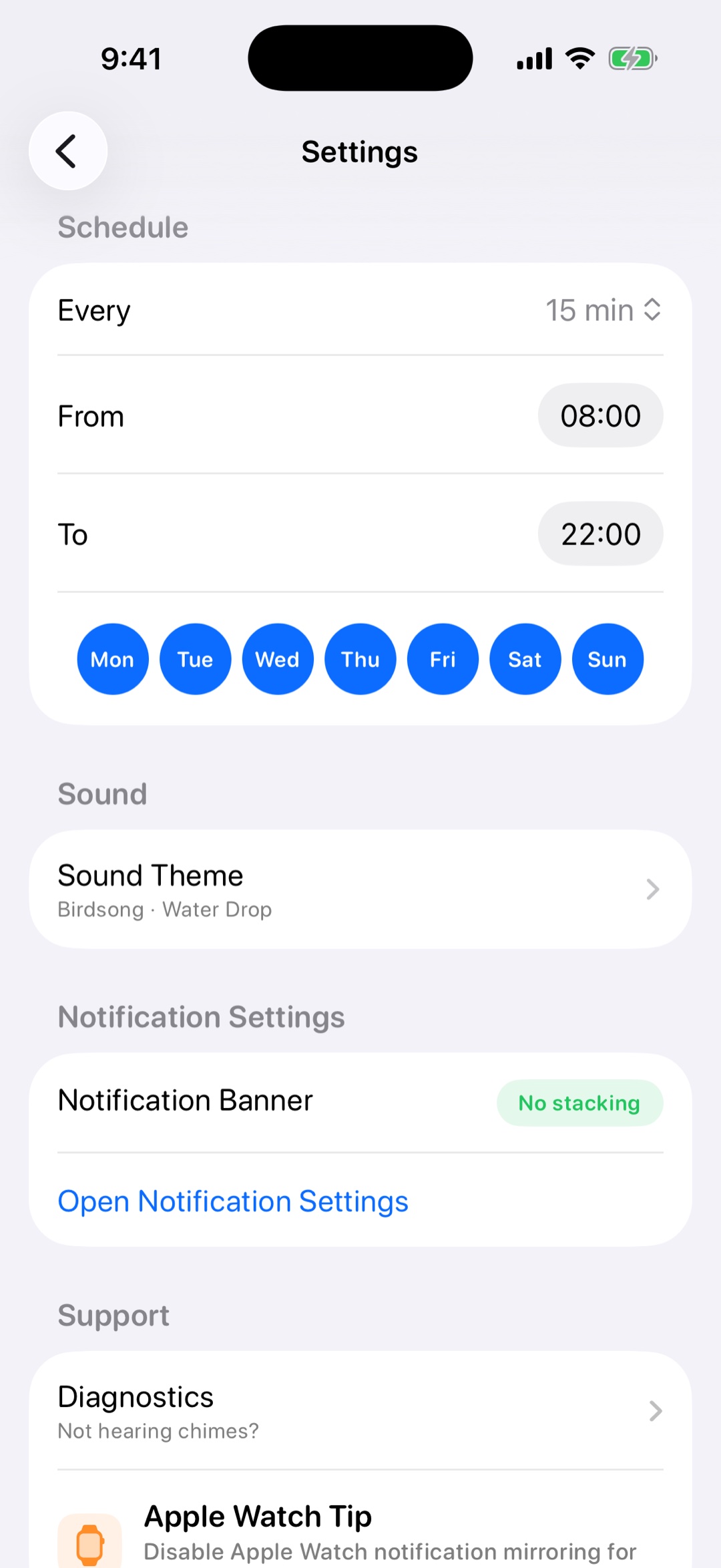
Hourly, 30-minute, or 15-minute chimes can keep time visible across the day.
If time slips away easily, a recurring sound or voice cue can make the day more visible. Chimebird is not a medical tool, but it can provide gentle reminders that help you notice time passing.
A focused chime workflow is easier to keep than another busy timer or alarm setup.
Hourly, 30-minute, or 15-minute chimes can keep time visible across the day.
A spoken time cue can be clearer than a simple bell when you need direct context.
Active hours and weekday filters help avoid reminders during rest or off-hours.
Try hourly chimes first, then use 30 or 15-minute intervals if you need stronger time awareness.
Use a light sound for ambient cues or voice announcements for explicit time checks.
Adjust the interval and active hours based on what actually helps your routine.
A chime cannot treat time blindness, but recurring cues can help some people notice time passing and reset attention.
Chimebird is a time reminder app, not a medical app. It may be useful for people who want external time cues.
Use voice when you need the exact time; use a sound when you only need a light reminder.
Yes. Active hours let you limit when reminders should run.