Spoken time without checking the clock
A short voice cue can say the time while you keep reading, coding, cooking, or studying.
When a tone is too vague and an alarm is too disruptive, a short voice time announcement can tell you exactly where the day is. Chimebird adds spoken time chimes to your iPhone with multilingual voice packs and quiet lock screen reminders.
A focused chime workflow is easier to keep than another busy timer or alarm setup.
A short voice cue can say the time while you keep reading, coding, cooking, or studying.
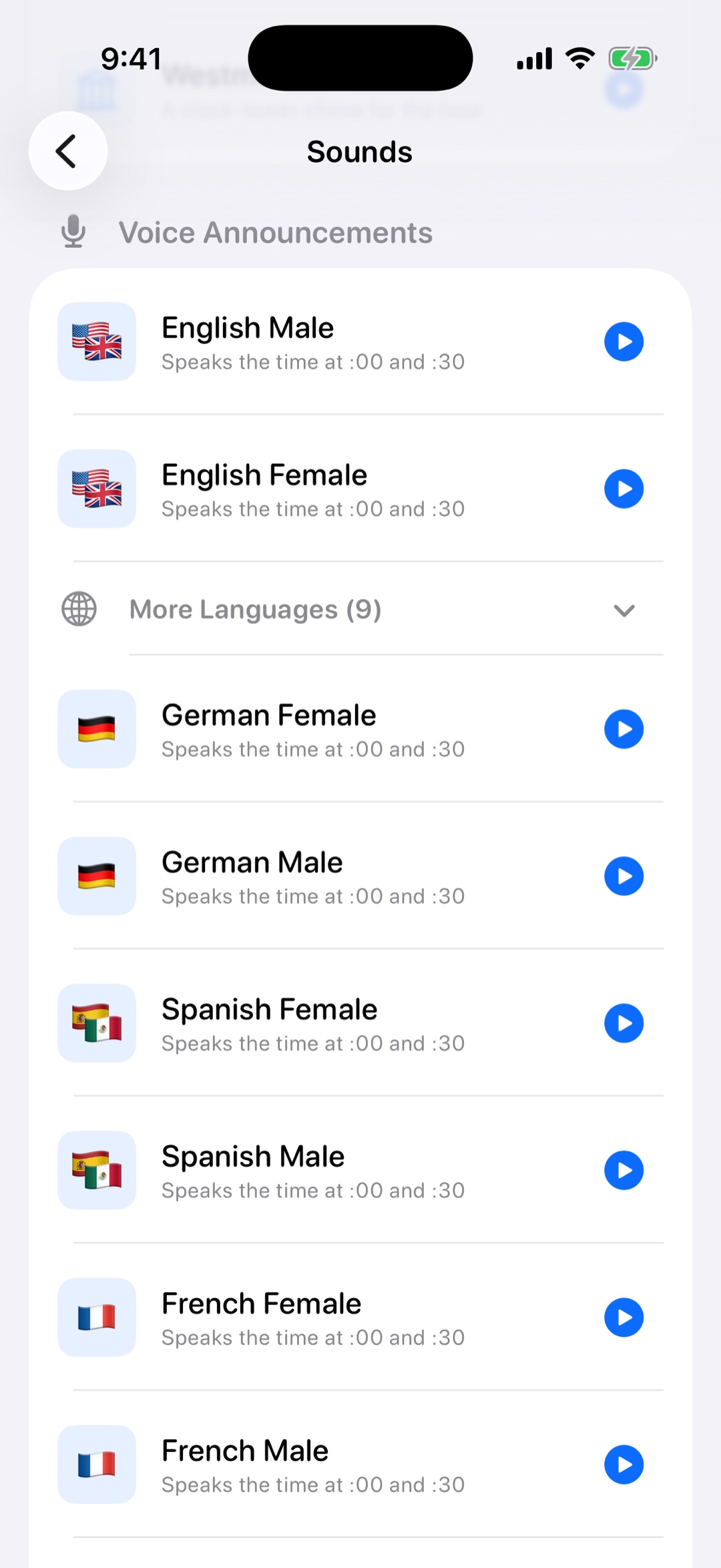
Pro includes English, Mandarin Chinese, Korean, Japanese, German, Spanish, Portuguese, French, Italian, and Dutch voice packs.
Voice chimes are scheduled through local notifications, so they can work from the lock screen without leaving the app open.
Pick a language and voice style when you want the reminder to tell you the time directly.
Use hourly voice announcements for a calm rhythm, or unlock 15 and 30-minute intervals for stronger time awareness.
Use guided notification setup to keep sound enabled while reducing visible notification clutter.
It is a spoken reminder that announces the current time at a scheduled interval, such as every hour or every 30 minutes.
Chimebird Pro includes voice packs for English, Mandarin Chinese, Korean, Japanese, German, Spanish, Portuguese, French, Italian, and Dutch.
Yes. Chimebird also includes natural sounds and chime themes such as birdsong, singing bowl, water drop, piano, and more.
Yes, as long as iOS notification settings allow the sound. Chimebird schedules local notifications ahead of time.